


Authentication technology "Passkey" attracting attention phishing attack resistance
In recent years, one of the most significant security threats facing online services has been the misuse of personal information and the financial losses caused by phishing attacks targeting end users. For example, in the Top 10 Information Security Threats published annually by the Information-Technology Promotion Agency (IPA) in Japan, the exploitation of personal information through phishing has consistently appeared every year since 2019 (*1).
Amid this growing threat, passkey-based login-an authentication technology designed to be inherently resistant to phishing-has gained considerable attention.
This article introduces passkey (FIDO-Based) authentication, explains how it enhances security against phishing, and highlights key points organizations should consider when adopting it.
-
(*1)
IPA, "Top 10 Information Security Threats 2024," July 29, 2024
https://www.ipa.go.jp/security/10threats/10threats2024.html
The Spread of Unauthorized Login Threats in Online Services
The advancement of digitalization has enabled a wide range of convenient online services, including e commerce, online banking, and travel reservations. However, this progress has also led to a rapid increase in cases where users are impersonated and harmed through phishing attacks. For example, the Financial Services Agency of Japan has reported a sharp rise in fraudulent online banking transfers-believed to be triggered by phishing-since February of Reiwa 5 (*2). In addition, phishing incidents have frequently appeared in recent news reports, with users suffering significant financial losses such as unauthorized transactions and unfamiliar withdrawals (*3) (*4) (*5).
Traditional phishing attacks typically involved directing victims to fake websites, stealing their IDs and passwords, and then using that information to log in illegally. In recent years, however, real time phishing attacks have emerged, making it insufficient for services to rely solely on two factor authentication (2FA).
Real time phishing is a technique in which attackers intercept authentication information entered on a phishing site in real time and immediately use it to access the legitimate service. Because stolen data is used instantly, attackers can bypass not only ID/password authentication but also 2FA methods such as SMS codes and voice calls.
While users can attempt to avoid phishing attacks by distinguishing legitimate websites from fake ones, highly sophisticated phishing pages are often difficult, if not impossible, to identify. As a result, the FIDO authentication method-login using a passkey-has gained significant attention as an authentication technology inherently resistant to phishing.
-
(*2)
Financial Services Agency: "Damage from fraudulent deposit transfers due to internet banking, which appears to be due to phishing, is rapidly increasing. "January 24, 2024
https://www.fsa.go.jp/ordinary/internet-bank_2.html - (*3) Yomiuri's "Chinese and Vietnamese Nationals Arrested for Allegedly Using Stolen Credit Card to Buy ¥700,000 Worth of Shinkansen Tickets" 2024/10/24 https://www.yomiuri.co.jp/national/20241024-OYT1T50056/
- (*4) Yomiuri's "Yamagata Railway Loses ¥100 Million in Phishing Scam Involving Fake Automated Calls Impersonating Yamagata Bank" 2025/03/12 https://www.yomiuri.co.jp/national/20250312-OYT1T50149/
- (*5) Yomiuri's "Brokerages Hit by Account Hijackings; Rakuten Securities Temporarily Suspends Buy Orders for 582 Chinese Stocks" 2025/04/05 https://www.yomiuri.co.jp/national/20250405-OYT1T50132/
What Is FIDO Authentication (Passkey-based login)?
First, let us look at how FIDO authentication works.
FIDO authentication is an online authentication method being developed and standardized by the FIDO Alliance (*6).
The FIDO authentication process consists of two major phases:
- Registration (Enrollment) - linking a passkey to a user account
- Authentication - logging in using that passkey
A passkey refers to the private key and associated metadata (such as key identifier and the domain of the target authentication server) that are generated and stored on the user's device during the registration phase. A unique passkey pair is created for each website and account, and the private key never leaves the user's device (authenticator).
Registration Phase (Figure 1)
During the registration process, the user first authenticates to the online service's authentication server using an existing method.
After the server sends a registration request, the user's device-acting as a FIDO authenticator-performs the following steps:
- Local user verification (e.g., face recognition, fingerprint, or PIN)
- Generation of a cryptographic key pair, consisting of a public key and a private key
- Secure storage of the private key on the device, bound to the domain of the authentication server
- Transmission of the public key and key identifier to the authentication server as a registration response
The authentication server then verifies the received data and stores the public key and key identifier associated with the user's account.
This process ensures that each passkey is uniquely tied to both the user's device and the service domain, making phishing-based credential theft virtually impossible.
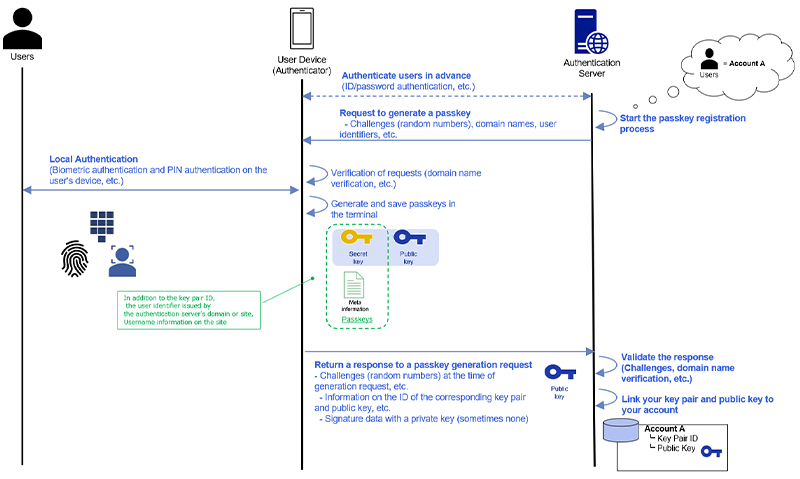
Figure 1. Passkey registration process
After the registration phase is complete, the authentication server initiates the authentication phase by sending an authentication request to the user's device using the previously registered passkey.
Upon receiving the request, the user's device (authenticator) performs the following steps:
- Local user verification
The device confirms the user's identity using a local method-such as face recognition, fingerprint authentication, or a PIN. - Private key signature creation
Once the user is verified, the authenticator signs the challenge data from the server using the private key securely stored on the device. - Response transmission
The authenticator sends the signed data along with the appropriate key identifier back to the authentication server.
The authentication server then uses the public key associated with the user's account-stored during the registration phase-to verify the signature.
If the signature is valid, the authentication process is successfully completed.
This mechanism ensures that authentication is performed via cryptographic challenge-response, with the private key never leaving the user's device. As a result, attackers cannot capture reusable credentials, making this method inherently resistant to phishing attacks.
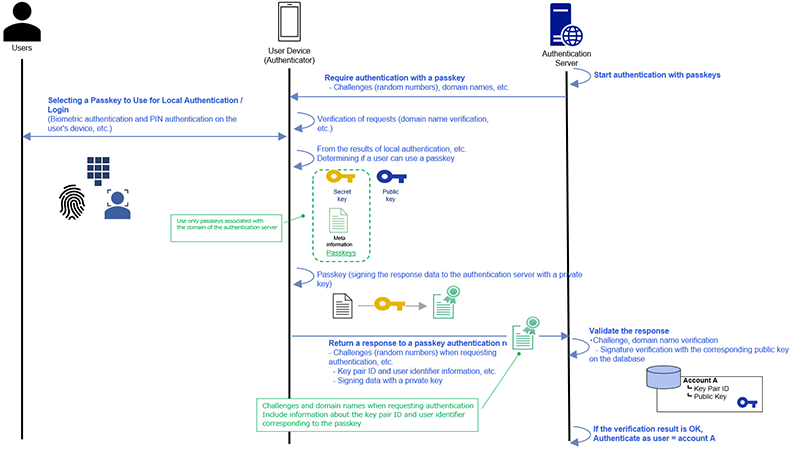
Figure 2. Authentication process with passkeys
Using FIDO authentication, users can log in without entering an ID or password, simply by authenticating on their smartphone (e.g., facial recognition).
-
(*6)
FIDO Alliance, Alliance Overview
https://fidoalliance.org/overview/
Benefits of Introducing Passkey-based login
A major security benefit of adopting passkey login is its strong resistance not only to the phishing attacks described earlier but also to credential stuffing attacks, a common technique used in unauthorized logins targeting password based systems (*7).
Even if a user is lured to a real time phishing site and the attacker intercepts or manipulates communication between the user's device and the authentication server, the attacker cannot obtain the passkey. This is because:
- The private key associated with a passkey never leaves the user's device.
- The user's device only uses passkeys that are cryptographically bound to the domain of the server it is directly communicating with.
- During authentication, the authentication server verifies whether the device is using a passkey specifically registered for that server's domain.
Therefore, even if an attacker creates a sophisticated fake site, the authenticator will not use the passkey-because the fake site's domain does not match the legitimate server's domain. As a result, unauthorized login attempts via phishing attacks fail (Figure 3).
This domain binding property is why passkey authentication is considered fundamentally resistant to phishing attacks.

Figure 3. Phishing attack resistance of passkey login
Passkey also provides significant benefits in terms of user convenience.
As mentioned earlier, users can authenticate themselves using the biometric features on their smartphones-such as facial recognition or fingerprint authentication-without needing to remember or type passwords. This greatly reduces login friction while maintaining strong security.
In addition, many platforms now support synced passkeys, enabling users to log in on multiple devices using the same passkey once it has been registered.
This is made possible through end-to-end encrypted cloud-based synchronization services provided by companies such as Apple and Google. When users log in with the same Apple ID or Google account on multiple devices, the passkeys stored on one device can be securely shared across all devices linked to that account. As a result, users can continue using passkeys even when switching to a new smartphone or adding a new device, without needing to re-register their passkey.
While synched passkeys still have limitations-such as the inability to synchronize across different cloud service providers-Microsoft has also announced future support for synced passkeys (*8). With multi-vendor adoption progressing, the functionality is expected to evolve further and provide even more convenience for end users.
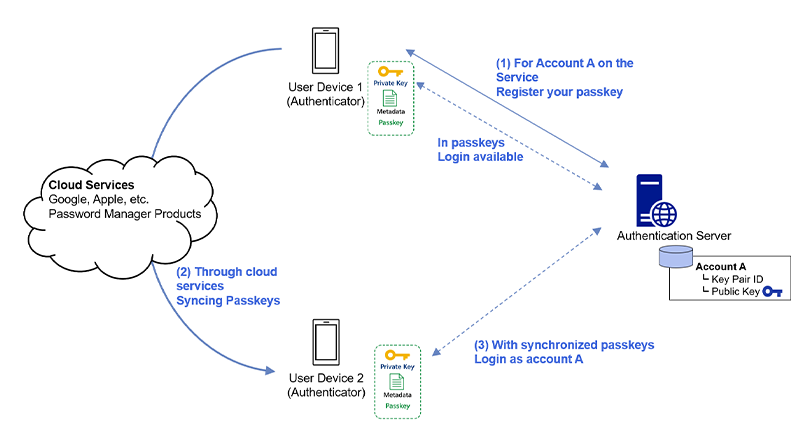
Figure 4. Synchronization of passkeys via cloud services
-
(*7)
FIDO Alliance, Passkey Security Phishing resistance
https://www.passkeycentral.org/introduction-to-passkeys/passkey-security#phishing-resistance -
(*8)
Windows Developer Blog, Passkeys on Windows: Authenticate seamlessly with passkey providers, October 8, 2024
https://blogs.windows.com/windowsdeveloper/2024/10/08/passkeys-on-windows-authenticate-seamlessly-with-passkey-providers/
Points to Keep in Mind When Introducing Passkey-based login
While passkey based login offers strong security and significant user convenience, there are several important considerations when introducing this feature.
1. User Awareness and Guidance Are Still Necessary
Although awareness of passkeys is gradually increasing, especially as some major services have already begun offering passkey login (*9)-many users are still unfamiliar with how passkeys work or how to use them.
When implementing a passkey-based login authentication, service providers should offer clear and accessible user guidance, such as:
- Step by step instructions with screenshots
- FAQs addressing common questions
- Clear explanations of security benefits
- Onboarding prompts or tutorials within the service
- Regular updates to guidance based on actual user behavior and feedback
Supporting users through careful communication is essential to ensure smooth adoption and minimize confusion.
2. Importance of Protecting Cloud Accounts Used for Synced Passkeys
For users who rely on synced passkeys, it is critical to remind them about safeguarding their cloud accounts. In the passkey synchronization model, cloud service providers such as Apple and Google-and even third party password managers-store and synchronize encrypted passkeys across a user's devices.
This design greatly increases convenience, but it also introduces a dependency:
If a user's cloud account is compromised, there is a risk that their synced passkeys could be accessed and used for unauthorized logins.
To mitigate this risk, service providers should encourage users to:
- Protect their cloud accounts with strong, unique passwords
- Enable two factor authentication (2FA) on cloud accounts
- Regularly check account activity logs for signs of unauthorized access
- Properly initialize or erase devices before disposal or hand over
- Review connected devices and revoke access when needed
By reinforcing these practices, service providers can help ensure that synced passkeys remain secure throughout their lifecycle.
-
(*9)
FIDO Alliance, New Data Finds Brands are Losing Younger Customers Due to Password Pain, as Passkeys Gain Mainstream Momentum, October 30, 2024
https://fidoalliance.org/new-data-finds-brands-are-losing-younger-customers-due-to-password-pain-as-passkeys-gain-mainstream-momentum/
Conclusion
In this article, we introduced the growing threat of phishing attacks in online services and explained how passkeys can help address these risks. Passkey based login not only strengthens security by preventing phishing and unauthorized login attempts but also enhances user convenience-especially through seamless biometric authentication and device synchronization.
At the same time, to successfully introduce passkey login, service providers must offer adequate support to users. This includes clear and accessible user guidance, ongoing education, and reminders about properly securing cloud accounts used for synced passkeys.
NTT DATA will continue to stay informed about the latest technological developments, deepen its expertise, and share knowledge to support safer and more user friendly online services.

Takeshi Shirakawa
Assistant Manager, NTT DATA, Solutions Sector, Security & Network Division, Cybersecurity Section
Since joining the company, gained wide-ranging experience from R&D to development and maintenance in the authentication and ID management domain. Currently engaged in project promotion and technical support for IDaaS implementation projects, as well as consulting in the security and authentication fields. CISSP.